Lapse: Face Timelapse, face-aligned transformation videos with privacy
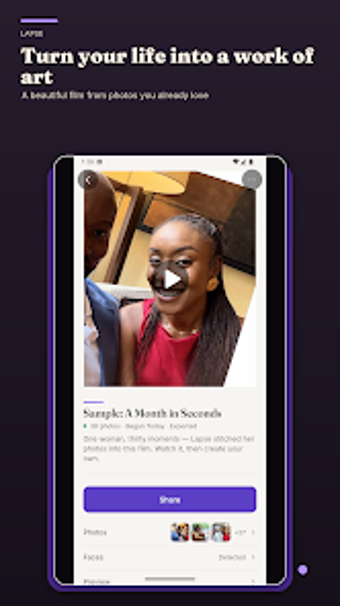
Lapse: Face Timelapse, from zirri23, records personal physical changes by compiling daily or periodic photos into a single timelapse. It assembles images and short videos into a framed sequence, using on-device AI to align faces and smooth transitions without manual cropping. The app accepts photo imports and video input, provides pace controls and background music, and offers social-ready aspect ratios. This targets parents, fitness trackers, and daily documenters who want automatic, private output with minimal setup.

Unlock your creativity with Adobe Stock
Get 10 images or 1 video with a free trial
What is Lapse used for?
The app focuses specifically on documenting gradual personal change, such as fitness progress, pregnancy, hair growth, or a child’s development. It removes repetitive framing tasks by detecting and centering faces automatically, so creators can produce consistent before-and-after sequences without manual alignment. That emphasis on single-subject sequences changes the workflow from manual cropping and matching to an automated capture-to-timelapse path tailored for long-term projects.
What export and import options does it provide?
Lapse imports individual photos and converts short videos into timelapses, sampling videos between two seconds and ten minutes and extracting up to 60 moments. Export choices include 480p, 720p, and 1080p resolutions with aspect ratios 1:1, 9:16, and 16:9, suitable for common social formats. The app also integrates with Google Photos and local galleries, which simplifies media selection for users who store images across services.
How does it behave on-device and with longer sources?
All face detection, sampling, and rendering run locally on the device, so processing completes without uploading images to external servers. That design keeps images on-device and requires camera and storage access for photo management and exports. Developers implemented sampling limits and local rendering to keep projects compact, which helps produce a polished clip while keeping the workflow entirely contained on the device.
Is Lapse better for beginners or professional users?
The app is aimed at creators who prefer low-effort results: predefined pacing, automatic alignment, and one-tap video assembly lower the entry barrier for beginners. Advanced users may miss granular controls, since the app provides background music integration but does not expose a dedicated multi-track audio mixer or deep color grading tools. The base tier also enforces project limits and watermarks; an upgraded tier removes those constraints for heavier workflows.
In conclusion, a practical choice for private, low-effort timelapses
In conclusion, Lapse is a practical option for individuals who need repeatable, face-centered transformation videos with minimal manual work. The base tier enforces project limits and watermarks, which may constrain long-term or multiple concurrent projects. Pick this tool when you prioritize quick setup and contained, device-only processing over extensive post-production controls and multi-track editing.